
Open Oracle Fusion records straight from your query results
Short answer: Data Collage lets you open supported Oracle Fusion records from a query result. Right-click a cell, choose the entity, and map its identifiers to result columns. You can also turn a column into clickable links to work through a list of records.
You have found an invoice with an unreleased hold. The next step is to inspect the record in Fusion: its status, related details, and the action your role allows. Searching for the same invoice again interrupts that investigation.
Data Collage connects the two steps. Use SQL to find the row, then open the corresponding business record in your browser.
How do I open a Fusion record from a result row?
- Include the required identifiers. Select the record ID alongside the business number or name.
- Choose the entity. Right-click a result cell and select the supported Fusion entity, such as an AP invoice, GL journal, purchase order, or project.
- Map the identifiers. Choose the result columns that supply the values the entity needs.
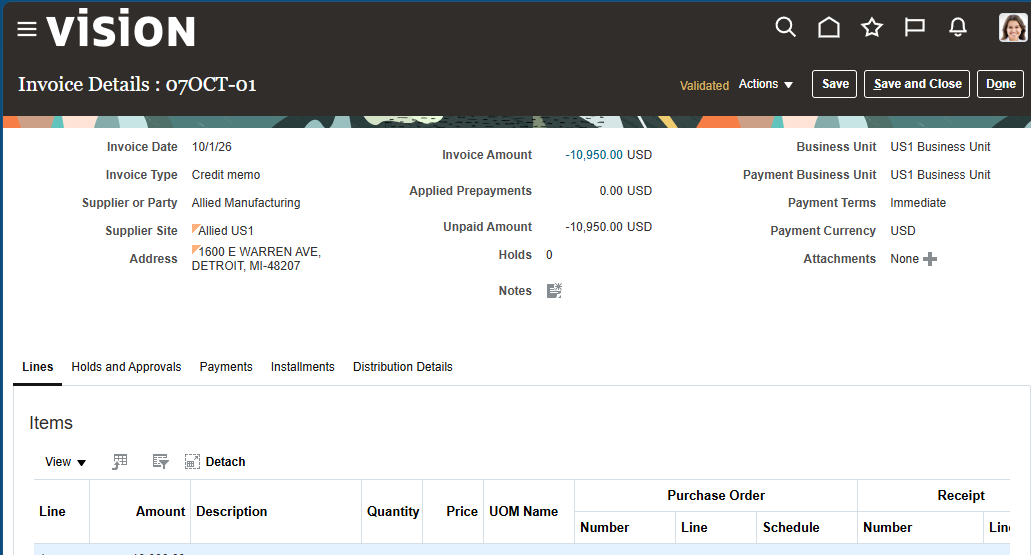
- Open the record. The link opens in your browser, using the Fusion session for that environment.
The entity determines which identifiers are required. Keep those fields in your query even if you later hide them from the grid.
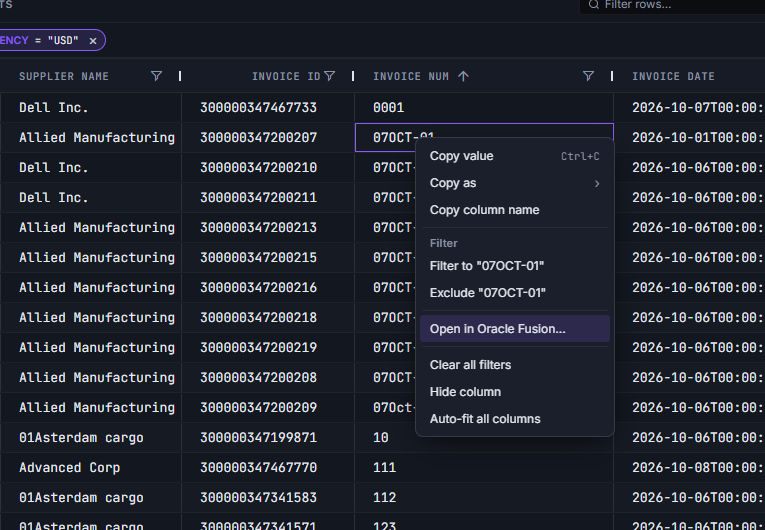
Make a whole column clickable
If you are working through a list, linkify the column once. Each row then provides a clickable link to its mapped Fusion record, so you can return to the list and open the next item.
This works well with filters and Top N. Narrow the returned rows to the items you need to investigate, then click through to their Fusion pages.
Example: investigate AP invoices with unreleased holds
Include the internal invoice ID so it is available for the link mapping. This example also uses a date range to keep the review focused:
SELECT ai.invoice_id       AS INVOICE_ID,
       ai.invoice_num      AS INVOICE_NUM,
       ai.invoice_date     AS INVOICE_DATE,
       ah.hold_lookup_code AS HOLD_CODE
FROM   ap_invoices_all ai
JOIN   ap_holds_all ah
       ON ah.invoice_id = ai.invoice_id
WHERE  ah.release_lookup_code IS NULL
AND    ai.cancelled_date IS NULL
AND    ai.invoice_date >= TO_DATE(:p_from_date, 'YYYY-MM-DD')
AND    ai.invoice_date <  TO_DATE(:p_to_date, 'YYYY-MM-DD') + 1
ORDER  BY ai.invoice_date DESC, ai.invoice_num
Choose the AP invoice entity and map the required identifier to INVOICE_ID. Open the invoice to inspect its holds and related details in Fusion.
An invoice can have several unreleased holds, so this query can return more than one row for the same invoice. Each row still points to that invoice; the hold code explains why it appeared.
Keep investigation and business actions connected
Data Collage remains read-only. Opening a record takes you to Fusion, where you can perform any actions your Fusion role permits. The browser page applies its own authorization checks.
Seeing an identifier in a reporting result does not guarantee permission to open or change the corresponding record. If Fusion denies access, review the page permissions with your administrator.
Three details that make record links useful
- Select IDs as well as names. A business number may be convenient to read, while the link needs an internal identifier.
- Check the environment. Confirm the query’s connection tag and use the corresponding Fusion browser session, especially when moving between PROD and UAT.
- Keep reviewed queries reusable. Save the SQL and its presentation as an analysis so colleagues can recreate the investigation.
Use SQL directives to hide technical ID columns from the initial display while retaining them in the result.
Frequently asked questions
Can I open any Oracle Fusion object from Data Collage?
Record opening is available for supported entities shown in the app’s entity list. Select the relevant entity and provide its required identifiers.
What does linkifying a column do?
It makes values in that result column clickable, using the identifier mapping to open the corresponding Fusion record.
Does a deep link bypass Fusion page security?
No. The page opens in your Fusion browser session, and Fusion decides what you can view or change.
Do I need to keep internal IDs visible?
Keep required IDs in the query result. You can hide technical columns from the display after including them.
Related features
- Results grid — filter and rank records before opening them.
- Saved analyses — reuse investigations across your team.
- Read-only SQL enforcement — understand Data Collage’s query boundary.
Want to connect your query results to the Fusion records behind them? Get in touch with Newarc Consulting to discuss your requirements and how to get started.