
Read-only SQL enforced before your query leaves your machine
Short answer: Data Collage accepts SELECT and WITH … SELECT queries. It parses SQL locally and rejects statements such as INSERT, UPDATE, DELETE, and DDL before sending them to Oracle Fusion.
A production investigation should have a clear boundary. You may need to inspect invoices, journal lines, or balances, but the tool you use for that work should make its execution rules easy to understand. Data Collage builds read-only validation into the query workflow.
How does Data Collage enforce read-only SQL?
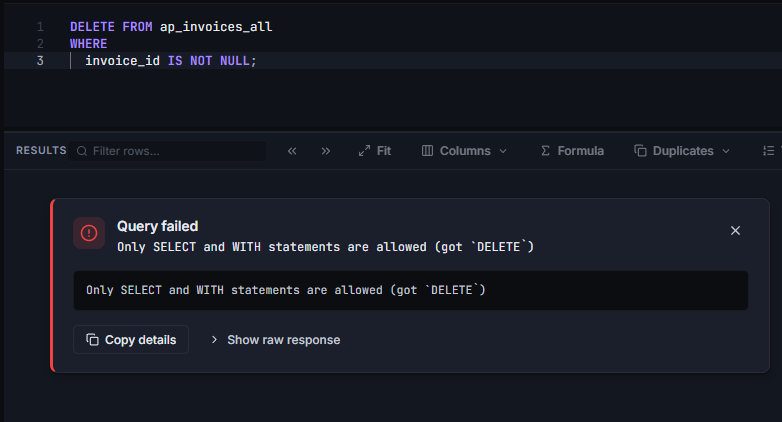
When you press Run, the app determines which SQL to execute, substitutes bind inputs, and parses the resulting statement. Only an allowed read-only query passes. A rejected statement stops locally with a message identifying the blocked type. For example: Only SELECT and WITH statements are allowed (got `DELETE`).
Selections containing several statements are blocked. In a multi-statement editor tab, place the cursor in the statement you want to run, or select one complete statement.
Which statements can I run?
| Statement | Data Collage behavior |
|---|---|
SELECT | Allowed after validation. |
WITH … SELECT | Allowed, including common table expressions. |
INSERT, UPDATE, DELETE | Rejected locally. |
DDL such as CREATE or DROP | Rejected locally. |
Joins, subqueries, and common table expressions remain available. You can structure a detailed investigation without using data-changing SQL.
Example: structure a query with a CTE
WITH invoice_totals AS (
    SELECT invoice_currency_code,
           COUNT(*) AS invoice_count
    FROM   ap_invoices_all
    WHERE  invoice_date >= TRUNC(SYSDATE) - 30
    AND    cancelled_date IS NULL
    GROUP  BY invoice_currency_code
)
SELECT invoice_currency_code,
       invoice_count
FROM   invoice_totals
ORDER  BY invoice_count DESC
This remains a read-only query. The following statement is rejected before transmission:
DELETE FROM ap_invoices_all
WHERE invoice_id IS NOT NULL;
Is read-only SQL safe to run in production Fusion?
Read-only enforcement blocks data-changing statements, but production suitability also depends on query scope, resource use, and reporting access. A large SELECT can still consume resources or exceed BI Publisher limits.
Each new tab starts with a 200-row limit. Choosing No limit turns the limit indicator amber and displays a warning. Select the columns you need, constrain dates and other business criteria, and check your environment tag before running.
If you repeat the same query on the same connection within five minutes, Data Collage offers to reuse existing results or fetch again. Choose a fresh fetch when you need updated data; reused results reflect the earlier run.
For size constraints and query-sizing advice, see Result size limits. A client row limit helps bound returned rows; it does not establish a fixed execution cost.
Read-only enforcement and data security do different jobs
Data Collage runs through BI Publisher as the signed-in Fusion user. That identity controls authentication and the catalog permissions needed to deploy and run the gateway.
Business-record restrictions must also be reflected in the query. Oracle states that physical SQL against base tables is not automatically subject to data-security restrictions; secured list views or suitable security filters are needed where those restrictions apply. See Oracle’s BI Publisher data-security guidance.
Your security team should review both authoring access and reporting SQL. The local read-only check governs which statements Data Collage sends; it does not create row-level security filters.
Frequently asked questions
Can I run UPDATE or DELETE against Oracle Fusion using Data Collage?
No. Those statements are rejected locally. Make business-data changes through your organization’s approved Fusion pages or integration processes.
Can I turn off read-only enforcement?
No. It is part of Data Collage’s execution behavior, rather than an optional connection setting.
Can I use WITH clauses and subqueries?
Yes. Read-only queries can include CTEs, joins, and subqueries.
Does a SELECT-only rule automatically secure the returned records?
No. Restricting statement types and restricting business records are separate controls. Use approved secured views or security filters where required.
Related features
- Secure connections — connect with your own Fusion identity.
- SQL editor — use binds and validation as you write.
- Saved analyses — reuse reviewed queries and their setup.
Want to discuss read-only Fusion analysis with your team? Get in touch with Newarc Consulting to discuss your requirements and how to get started.